


Send Gifts to
Family & Friends
IN ONE ORDER!
Ship to multiple addresses
in a single checkout.
should be delivered.

confirm quantities
in your cart
before you check out.
Benefits

One-Stop Shopping
Fill your cart with gifts for everyone.
One order, everything covered.

Shop Hassle-Free
Skip extra orders and repacking.
We handle it all.

Send Love Direct
Can't be there in person?
Deliver straight to their door.

Order Once & Save
Pay once and streamline shipping.
How It Works
Sending gifts to multiple people
is easy—just follow these steps:
Shop for All
of Your Gifts
Add every gift you'd like to send
and
confirm quantities
before starting checkout.
Start Checkout
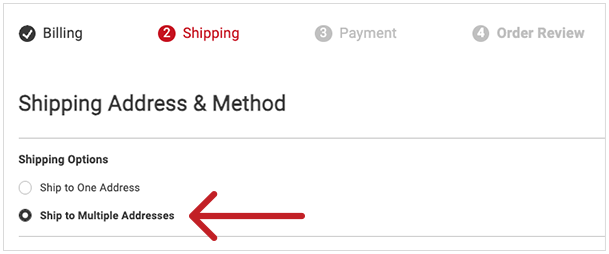
Choose Ship to Multiple Addresses
during checkout.
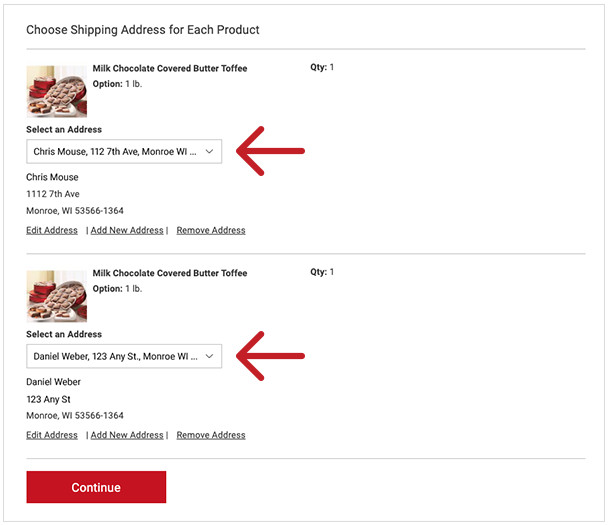
Tell Us Where Each Gift
Should Be Delivered
Assign a shipping address to each gift.
If you're signed in, you can select from your address book
and save new addresses for later.
Review and Complete
Your Order
Review your details, enter payment,
and place your order.
We'll take it from there!
changed once checkout begins,
so be sure your cart is complete
before you start.
Ready to Checkout?
Let's Do a Quick Check!
All gifts added to cart
Quantities reviewed
and confirmed
Ready to choose
where each gift should go
Signed in to save
and reuse addresses
from your address book
(Optional)
Gift messages ready
(Optional)
Gifting to Multiple Addresses: FAQs
Can I add gift messages?
Yes. Add or edit gift messages during checkout before you pay.
Where should I manage my saved addresses?
For the best experience, manage your saved addresses before checkout in My Account under Preferences > Manage Addresses. You can also add or edit addresses during checkout, but managing them in your account is the easiest way to keep everything up to date.
If I’m signed in, will my addresses be saved?
Yes. When you’re signed in, any shipping addresses you enter will be saved to your address book for future orders.
Can I save my cart and come back later?
If you are signed in, your cart will be saved for 30 days. Recipient selection for each item will not be saved.
Why can’t I add or remove items once checkout starts?
To make sure every gift ships accurately to its own address, items and quantities can’t be changed once checkout begins.
Can I change item quantities in checkout?
Items and quantities can’t be changed during checkout to ensure accurate shipping. To update them, return to your cart before completing payment. Recipient selections will not be saved.
Can I change an address in checkout?
Yes—addresses can be added or edited during checkout.